


 2 Player
 Action
 Adventure
 Basketball
 Bike
 Car
 Cooking
 Editor's Choice
 Fight
 Girl
 iO
 Kids
 Multiplayer
 No Ads
 Platform
 Puzzle
 Racing
 Retro
 Shooting
 Skill
 Soccer
 Sports
 Stickman
 Strategy
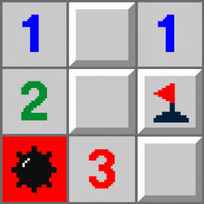


The board is waiting with every tile closed and a shovel already in your hand. Nothing tells you where the mines are except the numbers you dig up. Minesweeper is a free puzzle game you play in your browser. You open tiles on a hidden minefield, use the numbers to work out where each mine sits and flag them until only safe ground is left.
Game Controls
- Open or flag a tile: Left Click
- Switch to dig mode: SHOVEL BUTTON
- Switch to flag mode: FLAG BUTTON
How It Works
Minesweeper hides a set number of mines under a grid of closed tiles. Each safe tile you open shows how many mines touch it, counting all 8 neighbors, and a tile with no mines nearby clears the empty area around it on its own. Open a mine and the round is over. Open every safe tile and you win.
2 buttons at the bottom of the screen decide what a click does. With the shovel selected, clicking a tile digs it open. With the flag selected, clicking a tile plants or removes a flag. The counter at the top starts at the level's mine total and drops as you place flags, and a timer runs beside it. The mines are only placed after your first tap, so the opening move never hits one.
- Choose Easy, Normal or Hard on the level screen.
- Dig any tile with the shovel to start the timer.
- Read the numbers that appear around the opened area.
- Press the flag button and mark every tile you have proven is a mine.
- Press the shovel button and open the tiles the numbers show are safe.
- Repeat until every safe tile on the grid is open.
What Makes It Stand Out
- 3 levels: Easy has 10 mines on a 12 by 8 grid, Normal has 32 mines on 18 by 12, and Hard has 64 mines on 22 by 15.
- Shovel and flag modes: One tap does one job, so you never plant a flag by accident while digging.
- A safe opening: Mines are placed after the first dig, so the first tile you open is always clear.
- Best times per level: The level screen lists your fastest clear in seconds for Easy, Normal and Hard.
- Built for upright screens: The layout is designed for portrait mode, which suits a phone held in one hand.
Getting Started
- Play Minesweeper on Easy until the numbers feel automatic. Easy hides only 10 mines in 96 tiles, so you can learn the common patterns without many forced guesses.
- Check which mode is active before every tap. The highlighted button decides whether a click digs or flags, and a dig in the wrong place ends the round.
- Flag first, then dig. Marking the proven mines around a number makes the remaining safe tiles obvious at a glance.
- Work along the edge of the open area. Numbers that touch closed tiles are the only ones that give new information.
- Use the counter as a final check. When the counter hits 0 near the end, every tile still closed and unflagged is safe.
Going Further
Minesweeper gets harder through density as well as size. Easy hides a mine under about 1 in 10 tiles, Normal under about 1 in 7 and Hard under about 1 in 5, so Hard leaves far fewer easy openings. The 1-2-1 pattern along a wall always puts mines under the outer 1s and keeps the 2 safe, and spotting it saves several moves. Some positions can't be solved by logic, and when 2 closed tiles share identical clues, guessing early wastes less time than guessing after minutes of work. The only progression here is your best time, so faster clears come from switching modes less often, flagging in batches and digging in batches.
Mistakes Worth Avoiding
- Digging while flag mode is off by mistake. A tap meant as a flag opens the tile instead, and on a mine that ends the round.
- Ignoring diagonal neighbors. Each number counts all 8 surrounding tiles, so a diagonal mine still adds to it.
- Flagging on a hunch. A wrong flag throws off the counter, which then can't be trusted for the endgame check.
- Jumping to Hard too soon. Hard packs 64 mines into 330 tiles, and the patterns come too fast to learn there.
- Guessing far from the open area. A random tile in the middle of the closed space tells you nothing, while one beside the numbers can connect to what you know.
Similar Puzzle Games
If reading clues to clear a grid is what you liked, Google Minesweeper is the same idea with its own board sizes, right click flagging and a mouse first layout. Sudoku keeps the pure deduction but replaces mines with numbers you place yourself. Nerdle turns logic into a hidden math equation that you narrow down guess by guess. More picks are in Puzzle Games.
Final Thoughts
The Minesweeper game is a tidy take on the classic, and the shovel and flag modes make it one of the better versions for a touchscreen. Playing Minesweeper online with a mouse means extra clicks to switch modes, though. Players who want custom grid sizes or right click flagging should look elsewhere.
Gameplay Video
FAQs About Minesweeper
What is Minesweeper?
Minesweeper is a single player logic puzzle where you open tiles on a grid without hitting hidden mines. Each opened tile shows how many mines touch it, and the round is won when every safe tile is open.
How to play Minesweeper?
Pick the shovel and click a tile to dig it, or pick the flag and click a tile to mark a mine. Use the numbers to find every mine and open all the safe tiles.
How many mines are in Minesweeper?
Minesweeper has 10 mines on Easy, 32 on Normal and 64 on Hard. The grids measure 12 by 8, 18 by 12 and 22 by 15 tiles.
Can I play Minesweeper on mobile?
Yes. Minesweeper is designed for portrait screens, so it fits a phone held upright. You tap tiles and switch between the shovel and flag buttons at the bottom.
Is the first move safe in Minesweeper?
Yes. Minesweeper places the mines after your first dig, so the first tile you open never contains a mine.
Does Minesweeper keep your best time?
Yes. Minesweeper shows your best time in seconds for Easy, Normal and Hard on the level selection screen.