


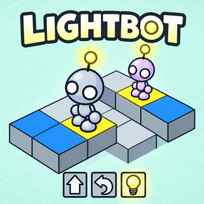


You never move the robot. You write its instructions, press Go, and watch it walk into a wall. Lightbot is a free coding puzzle game you play in your browser. You drag command tiles into a main program and 2 functions to steer a robot across a factory floor and switch on every blue tile, using as few commands as you can.
Key Controls
- Use MOUSE and LEFT-CLICK
How It Works
Lightbot hands you 5 commands: forward, turn left, turn right, jump and light. The board is a grid of blocks at different heights with a few blue tiles on it. Fill the main program with commands, press Go, and the robot executes them in order. Every blue tile lit and the level is done; anything else and you edit and run again.
The main program has 12 slots, which stops being enough fast. That's what the 2 functions are for: F1 and F2 each hold 8 commands, and a single tile in the main program calls the whole block. The Lightbot game counts every command you place, and a lower total is the better score.
- Find every blue tile on the board before placing anything.
- Drag forward, turn and jump tiles into the main program.
- Drag a light tile into the slot where the robot is on it.
- Click Go and watch where the robot ends up.
- Move any repeated run of commands into F1 and call it.
- Edit the sequence and run again until every tile is lit.
What Makes It Stand Out
- 5 commands, nothing else. Forward, turn left, turn right, jump and light.
- 12 levels. Each adds height or repetition the last one didn't need.
- 2 functions of 8 slots. F1 and F2 are the only way past the 12-slot main program.
- Score is command count. Fewer is better.
- A classroom staple. University intro programming courses assign all 12 levels.
- No timer and no lives. A failed run costs a click.
Getting Started
- Trace the route before you drag anything. Lightbot punishes guessing, because a wrong turn in slot 3 wastes every slot after it.
- Put the light tile where the robot stands, not where it's heading. Light fires on the block under the robot, so a light placed one slot early switches on nothing.
- Use jump for any change in height. Forward walks into a raised block and stays put.
- Fill F1 the first time a pattern repeats. A climb-and-light that costs 4 tiles done 3 times is the whole 12-slot main program.
Going Further
The fastest way to a low score in Lightbot is to design the function first and the main program second, because every tile saved in a function is saved on each call. F2 is worth saving for the second pattern that repeats rather than spending it as overflow for the first, since a level with 2 distinct climbs needs 2 distinct routines. Overshooting is cheaper than it looks, since a function that walks one block too far can still cost fewer tiles than a tailored one. There is no currency or unlock in Lightbot, so progression is the 12 levels in order and the only thing to chase afterward is a lower command total. The last levels are where the 12-slot main program finally bites, and the solutions that fit use both functions.
Mistakes Worth Avoiding
- Calling an empty function. The tile runs nothing and still costs a slot.
- Writing the whole route in the main program. 12 slots run out by the middle levels.
- Calling a function that ends facing the wrong way. Every later call inherits the bad heading.
- Forgetting the starting direction. The first tile is often a turn, not a step.
Similar Puzzle Games
If you liked choosing a move and watching it play out, Escaping the Prison is a stickman breakout with 3 escape routes and more than 18 ways to fail. If the short, pointed design was the draw, We Become What We Behold is a 10-minute game about a camera, a crowd and what attention does to both. For a puzzle where you nudge instead of program, La Madriguera has you shove objects around one room until gravity hands a bear its cake. More in Puzzle Games.
Final Thoughts
This is a programming lesson disguised as a 12-level toy, and the disguise holds until 12 slots stop being enough. Skip it if you want action or unlocks; it's a robot and a scoreboard. Play Lightbot online until F1 clicks and you'll know whether writing the moves beats making them.
FAQs About Lightbot
What is Lightbot?
Lightbot is a coding puzzle game developed by Danny Yaroslavski and published by Armor Games in 2008. Players arrange command tiles in a main program and 2 functions to guide a robot across a block grid and light every blue tile.
How to play Lightbot?
Drag the forward, turn left, turn right, jump and light tiles into the main program, then click Go to run them in order. Repeated sequences go into F1 or F2 and are called with a single tile. The level is complete when every blue tile is lit.
Do you need to know how to code to play Lightbot?
No. Lightbot uses picture tiles instead of written code. The game teaches sequencing and functions by playing, which is why it is used in introductory computer science classes.
How many levels does Lightbot have?
Lightbot has 12 levels. The early levels need only the main program, and the later levels need both functions to fit the slot limits.
How do functions work in Lightbot?
Lightbot has 2 functions, F1 and F2, each holding up to 8 commands. Placing an F1 or F2 tile in the main program runs every command in that function, and the same tile can be placed as many times as needed.
How do you get a lower score in Lightbot?
The score in Lightbot is the number of command tiles placed, so a lower score comes from moving repeated sequences into functions and removing any tile the robot does not need.
Can I play Lightbot on mobile?
Lightbot was built for desktop browsers with mouse drag-and-drop, and the original has no touch version. The developer's later Lightbot apps for phones and tablets are separate games with different levels.