


 2 Player
 Action
 Adventure
 Basketball
 Bike
Bike Car
Car Cooking
 Editor's Choice
 Fight
Fight Girl
Girl iO
iO Kids
Kids Multiplayer
 No Ads
 Platform
 Puzzle
 Racing
 Retro
Retro Shooting
 Skill
Skill Soccer
 Sports
 Stickman
 Strategy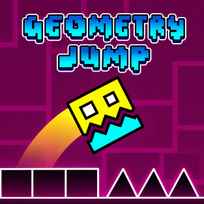




Most games in this style throw you back to the start for every mistake. This one hands you 10 flags and lets you decide where the start is. Geometry Jump is a free rhythm platformer you play in your browser. You guide an auto-running block over spikes, walls and saws across 15 levels, plant flag checkpoints with F, and spend the stars you collect on new cubes and jets.
Key Controls
- Jump: SPACE, UP ARROW or LEFT-CLICK
How It Works
Geometry Jump moves your block forward on its own, so the only decision is when to leave the ground. Spikes, walls and saws line the path, and touching any of them ends the attempt. Some stretches swap the block for a jet, where holding the jump input climbs and letting go drops. A progress bar at the top shows how much of the level is left.
Checkpoints come in 2 kinds. Portals mark the end of each section and respawn you there after a crash, and on top of that you carry 10 flags per run, planted with F wherever you're standing. Crash with no flag behind you and the level starts over. The Geometry Jump game pays stars as you play, and the shop turns them into new cubes and jets.
- Start the first of the 15 levels.
- Press SPACE, UP ARROW or LEFT MOUSE to jump each spike.
- Hold and release the jump input to steer jet sections.
- Reach a portal to lock in the section.
- Open the pause menu to slow the speed or visit the shop.
What Makes It Stand Out
- 10 flags per run. Player-placed checkpoints on top of the fixed portals.
- 15 levels. Faster pacing and tighter gaps as they go.
- A speed slider. The pause menu slows the level for practice.
- Jet sections. Hold to climb, release to fall.
- A star shop. Stars buy new cubes and jets.
- A progress bar. It shows how far is left.
Getting Started
- Plant a flag after a hard section, not before it. Geometry Jump respawns you exactly where the flag went, so a flag in front of a spike pit just restarts the pit.
- Slow the speed for your first look at a level. The slider in the pause menu turns a blur of spikes into a pattern you can read.
- Tap jets, don't hold them. Holding through a jet section climbs straight into the ceiling; short presses keep the jet level.
- Pick one jump input and keep it. Space, Up Arrow and Left Click all work, but switching mid-level throws off your timing.
Going Further
The fastest way to clear a level in Geometry Jump is to treat the 10 flags as a budget, because a run with flags spent early has nothing left for the hard final stretch. Portals already cover the start of each section, so a flag planted right after a portal is a flag wasted. The speed slider is a practice tool, not a crutch: learn a section slow, then raise the speed before the full run, since the rhythm changes with the pace. Stars are the only currency and come from playing levels, so replaying a level you know well is the steadiest way to fund a new cube or jet. Jets reward a light touch more than any spike pattern does, so a level with a long jet stretch is worth slowing down first.
Mistakes Worth Avoiding
- Planting a flag on the edge of a hazard. You respawn with no room to react.
- Spending flags in the easy opening. The hard section at the end gets none.
- Flagging next to a portal. The portal already saves that spot.
- Holding the button through a jet section. The jet climbs into the ceiling.
Similar Rhythm Platformer Games
If the auto-runner timing hooked you, Geometry Dash Lite syncs every level to its own soundtrack and adds a practice mode with checkpoints. If you want the same jumps with an older look, Famidash redraws the genre as an 8-bit demake with spring pads and flying sections. For a shorter take, Geometry Dash is a Scratch-made version with 3 levels and power-ups that bend the physics. More in Skill Games.
Final Thoughts
This is a one-button platformer that trusts you with your own checkpoints, and the flags change how every level feels. Skip it if dying on the same spike 20 times sounds like punishment rather than progress. Play Geometry Jump online with the speed turned down first and you'll know within a level whether the rhythm clicks.
FAQs About Geometry Jump
What is Geometry Jump?
Geometry Jump is a rhythm platformer developed by GM Media. Players jump an auto-running block over spikes, walls and saws across 15 levels, using portals and player-placed flags as checkpoints.
How to play Geometry Jump?
Press Space, the Up Arrow or the left mouse button to jump, and hold the input to fly in jet sections. Press F to plant a flag checkpoint, and use the pause button in the top right corner to change the speed or open the shop.
Is Geometry Jump the same as Geometry Dash?
No. Geometry Jump is a separate game by GM Media in the same one-button rhythm platformer style. It has its own 15 levels, a flag checkpoint system and a star shop.
How many levels does Geometry Jump have?
Geometry Jump has 15 levels. The levels speed up and tighten as they go, and a progress bar at the top shows how much of each level is left.
How do flags work in Geometry Jump?
Geometry Jump gives 10 flags per run, planted with the F key. After a crash the block respawns at the last flag or portal, and with neither behind it the level restarts.
How do you unlock new cubes in Geometry Jump?
New cubes and jets in Geometry Jump are bought in the shop with stars. Stars are collected by playing levels, and the shop is reached through the pause menu.
Can I play Geometry Jump on mobile?
Yes. Geometry Jump runs in a mobile browser, where you tap the screen to jump.