


 2 Player
 Action
 Adventure
 Basketball
 Bike
 Car
 Cooking
 Editor's Choice
 Fight
 Girl
 iO
 Kids
 Multiplayer
 No Ads
 Platform
 Puzzle
 Racing
 Retro
 Shooting
 Skill
 Soccer
 Sports
 Stickman
 Strategy
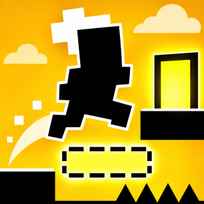


Press jump in Glitch and the whole screen flips color, from warm yellow to cool teal, and the floor under your feet may simply stop existing. Glitch is a minimalist puzzle platformer where every jump swaps which platforms are solid and which are hollow outlines, so you move a tiny dark figure toward a glowing exit block by planning when to jump as much as where. One mistimed hop drops you into the void and back to the start of the level.
Main Controls
- Move: LEFT ARROW KEY and RIGHT ARROW KEY
- Jump and switch platforms: UP ARROW KEY
- Menus, Pause and Skip: LEFT CLICK
How It Works
Glitch opens with a short scene of a sleeping figure on a tiny island before the title glitches into view, and a Skip button lets you jump past it. The first level is pure introduction: the screen asks whether the world is glitching and invites you to jump and find out, and walking into the bright yellow block on the right finishes it. The second level, First Hello, spells out the rule in a single line: every time you jump, some platforms glitch in and others disappear.
In practice that means the level has two states. In the yellow state, the left and right platforms are solid while the middle one is only an outline; jump, and the screen turns teal, the middle platform becomes solid and the outer ones turn into outlines. Land on an outline and you fall straight through, the figure reappears at the start with an exclamation mark, and the level resets. After a few failures a Hint button with a video icon appears in the corner, and a tip suggests turning off effects in Settings if the game lags.
- Press Play or pick a stage from the Levels menu.
- Watch or skip the opening scene.
- Walk with the LEFT and RIGHT ARROW KEYS.
- Look at which platforms are solid and which are outlines.
- Jump with the UP ARROW KEY so the platform you need turns solid.
- Land, then jump again to switch the next section back.
- Walk into the glowing exit block to finish the level.
What Makes It Stand Out
- Jump flips the world: Every jump swaps solid platforms for hollow ones.
- Two color states: Yellow and teal tell you at a glance which layout is active.
- Named levels: Stages have titles, starting with First Hello.
- Level select: The Levels menu lists numbered stages, at least 16 of them.
- Instant retries: A fall resets the level within a second.
- Hint button: Help appears after repeated failures.
Getting Started
- Read the platforms before moving in Glitch. Solid blocks are filled in, while outlines will not hold you.
- Jump from the very edge. The switch happens the moment you leave the ground, so you need to land on the new solid section.
- Never jump in place on a platform that will vanish. In First Hello, jumping on the starting block turns it into an outline under you.
- Turn off effects if it stutters. The game itself suggests this in Settings.
Going Further
Glitch is less about reflexes than about counting jumps. Every jump flips the layout, so a route becomes a sequence: one jump to reach the middle, one more to bring the far side back. Planning that order before you move is the fastest way through, and an odd number of jumps leaves you in the opposite state from where you started. Because a fall costs only a second, testing a route is cheap, and the Hint button is there when a layout refuses to make sense.
Mistakes Worth Avoiding
- Jumping out of habit. Each jump changes the floor, not just your height.
- Treating the decor as platforms. Background houses and trees are not solid.
- Landing on an outline. Hollow blocks drop you the moment you touch them.
- Ignoring the color. Yellow and teal mean different solid platforms.
Similar Platform Games
Level Devil also changes the level under your feet, with floors collapsing on the way to the exit door. Devil Dash is another puzzle platformer about working out where the danger hides before you move, and Egg Adventure sends Mr Egg through a dangerous world of jumps. For more running and jumping, open Platform Games.
Final Thoughts
One rule carries the whole thing, and the levels keep finding new ways to twist it. The Glitch game rewards players who like to stop and think before a jump, while anyone after fast action will find the pace deliberate. Glitch online needs only three keys, and it is also set up for phones held sideways.
FAQs About Glitch
What is Glitch?
Glitch is a minimalist puzzle platformer. Every jump switches which platforms are solid, and you guide a small figure to a glowing exit block on each level.
How to play Glitch?
Move with the LEFT ARROW KEY and RIGHT ARROW KEY and jump with the UP ARROW KEY. Plan each jump so the platform you need becomes solid before you land on it.
What happens when you jump in Glitch?
Each jump flips the level between a yellow and a teal state. Platforms that were solid turn into hollow outlines, and outlined platforms become solid.
Why do I keep falling in Glitch?
You fall when you land on a hollow outline. In Glitch, jumping in place on a platform that is about to vanish drops you straight through it.
Does Glitch have hints?
Yes. After a few failed attempts, a Hint button with a video icon appears in the corner of the screen.
Can I play Glitch on mobile?
Glitch is set up for phones and tablets on Rocket Games and is meant to be held in landscape. On a computer it uses only the arrow keys.