


 2 Player
 Action
 Adventure
 Basketball
 Bike
 Car
 Cooking
 Editor's Choice
 Fight
 Girl
 iO
 Kids
 Multiplayer
 No Ads
 Platform
 Puzzle
 Racing
 Retro
 Shooting
 Skill
 Soccer
 Sports
 Stickman
 Strategy
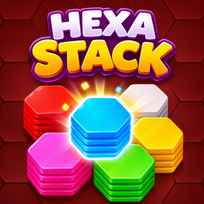


Hexa Stack is a color sorting puzzle played on a board of hexagon cells. Small stacks of colored tiles arrive three at a time, and your job is to place them so that matching colors slide together and pile up until they clear. Every clear counts toward the level goal, and every finished level helps rebuild a little island between rounds, which gives the calm puzzling a sense of progress.
Game Controls
- Drag a stack onto the board: Left Click and drag
- Use a booster or a menu button: Left Click
How It Works
Hexa Stack opens straight into the first level, with an empty board of 19 hexagon cells, a goal counter at the top and a tray of 3 stacks at the bottom. A hand and a yellow arrow point out the first move from the tray to the board. Once all 3 stacks in the tray are placed, a new set of 3 appears. The goal on our first level was 80 tiles, and the counter dropped every time a color cleared, from 80 to 70, then 46, then 12, until the level ended with a burst of particles.
The sorting happens on its own. When a stack lands next to another stack whose top tiles share its color, those tiles flip across and join the taller pile. Many stacks are layered, so moving the top color away reveals a different one underneath, which can set off a chain of further moves. When one color piles up high enough, the whole column clears and a number like +11 or +12 floats up to the counter. The board does not grow, so the challenge is keeping cells free while the colors sort themselves out.
- Look at the 3 stacks in the tray and the colors already on the board.
- Drag a stack into an empty cell next to a matching top color.
- Watch the tiles slide between neighbors and stack up.
- Let tall single color stacks clear to lower the goal counter.
- Place all 3 stacks to get a fresh set in the tray.
- Keep empty cells open so later stacks always have a spot.
- Reach 0 on the counter to finish the level and earn gems for the island.
What Makes It Stand Out
- Automatic merges: Matching top tiles slide between neighbors without extra clicks.
- Layered stacks: Moving one color away uncovers the next, so a single drop can trigger a chain.
- An island to rebuild: Island 1, Beach View, has a 5 step progress bar, and the gems from each level put up its next building.
- Growing goals: The tile target rose from 80 on level 1 to 100 on levels 2 and 3, then 200 on level 4.
- Changing boards: Level 3 widened the grid to 23 cells, and level 4 began with 6 stacks already placed in a ring.
- Boosters that unlock with play: The Hammer arrives at level 3 with 2 free uses, and 3 more boosters open at levels 5, 8 and 11.
Getting Started
- Place stacks with a plan in Hexa Stack. Before dragging, check which top colors on the board match the stacks in your tray.
- Build toward one tall pile per color. Feeding the same stack keeps clears coming and frees cells quickly.
- Use the edges for odd colors. A stack with no match nearby blocks fewer neighbors in a corner than in the middle.
- Save the Hammer. It clears one object from the board, which is most useful when a single stack is choking the grid.
Going Further
The Hexa Stack game rewards thinking two drops ahead. On our second level the board already held gray, yellow and pink stacks, and the best moves were the ones that connected those colors rather than opening new spots. As levels grow, layered stacks matter more: a tray piece with red on top and green underneath can feed a red pile now and a green one right after. Between levels, the home screen adds extras around the puzzles: 6 hearts, a Lucky Wheel with a daily jackpot of 1,500 coins and prizes such as 30 minutes of unlimited lives, a Tournament tab, a piggy bank and event icons that unlock at levels 5 and 10. We also earned 5 coins per level, starting from 1,000.
Mistakes Worth Avoiding
- Filling the center first. It blocks the most neighbors at once.
- Dropping stacks with no match. They take a cell without starting a merge.
- Ignoring the colors underneath. Hidden layers decide the next chain.
- Using boosters too early. The Hammer has only 2 free uses.
Similar Puzzle Games
The closest relative is Hexa Sort, which also stacks and merges colored hexagon tiles on a hex grid to clear piles and score points. HexaLau keeps the hex board but swaps colors for numbers, linking 4 matching tiles to upgrade their value. For a different kind of color sorting, Water Sort Puzzle has you pour liquids between tubes until each one holds a single color. More brain teasers are waiting in Puzzle Games.
Final Thoughts
Few puzzles feel as relaxing when a long chain of merges goes off on its own, and the shrinking goal counter keeps each level short and focused. The island adds a reason to keep going without getting in the way of the sorting. Hexa Stack online works with a mouse on a computer, and on phones and tablets the stacks can be dragged with a finger.
FAQs About Hexa Stack
What is Hexa Stack?
Hexa Stack is a color sorting puzzle on a hexagon board. You place stacks of colored tiles so matching colors merge and clear, filling a tile goal on each level.
How to play Hexa Stack?
Drag one of the 3 stacks from the tray into an empty cell with a left click. Matching top tiles slide together, tall single color stacks clear, and the level ends when the goal counter reaches 0.
What does the Hammer do in Hexa Stack?
The Hammer clears one object from the board. It unlocks on level 3 with 2 free uses, so it is best saved for a stack that blocks the grid.
When do new boosters unlock in Hexa Stack?
Hexa Stack unlocks the Hammer on level 3, and 3 more boosters open on levels 5, 8 and 11.
What is the island in Hexa Stack?
After each level, the gems you earned go toward rebuilding Island 1, Beach View. Holding the fill button puts up its next building, such as a house or a lighthouse.
Can I play Hexa Stack on mobile?
Yes. Hexa Stack works in mobile browsers on phones and tablets held in portrait orientation, and the stacks are dragged with a finger.