


 2 Player
 Action
 Adventure
 Basketball
 Bike
 Car
 Cooking
 Editor's Choice
 Fight
 Girl
 iO
 Kids
 Multiplayer
 No Ads
 Platform
 Puzzle
 Racing
 Retro
 Shooting
 Skill
 Soccer
 Sports
 Stickman
 Strategy
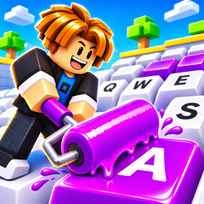


Paint My Keyboard turns a plain grey field into a giant keyboard that you cover in color one step at a time. It is an idle obby where a blocky painter carries a roller and a paint bucket, runs across oversized letter keys and earns cash for every step, then spends that cash on better paint, more land and, eventually, a team of workers who keep the money flowing.
Key Controls
- Move: W, A, S, D
- Jump: Space
- Buy land and open shops: E
- Free the mouse cursor: Tab
- Menus and upgrades: Left Click
How It Works
Paint My Keyboard starts with a character choice between a boy in a red hoodie and a girl in a pink one, 200 in cash and a hint telling you to move with W, A, S, D and press all the buttons. A box in the top right corner always shows the next goal, and a trail of arrows on the ground points the way. Our first goal was to buy a lot. Standing in front of an Increase land sign brings up a Buy a lot prompt, and pressing E made a row of grey keys marked with letters like B, N, T and K appear on the grass.
The next goal was to fill up on paint. A huge white paint tank stands beside the field, and once we stood right in the puddle under its tap a meter at the bottom of the screen climbed to 150 out of 150 gallons. The game then sent us to a stall where a worker in a hard hat sells paint. Basic Paint pays 3 per step, Creamy Paint pays 6 per step for 200, and Ice Paint pays 10 per step for 3K. We bought Creamy Paint, the income counter at the top jumped from 16 to 22 per second, and a few laps over the keys turned them cream colored and pushed our cash from 0 to 592.
- Choose your character and press E at an Increase land sign to buy your first lot.
- Stand in the puddle under the paint tank until the gallon meter is full.
- Run back and forth across the keys to paint them and earn cash.
- Visit the paint stall and press E to buy paint that pays more per step.
- Refill at the tank whenever the meter runs low.
- Buy new land at the next sign to add more keys to paint.
- Save up for a rebirth to unlock new paints and workers.
What Makes It Stand Out
- A keyboard as the playground: Every lot adds giant letter keys to run across and paint.
- Clear goals: A corner box and an arrow trail always show what to do next.
- Paint tiers: Each new paint raises the cash you earn for every step.
- Collectible keycaps: Star, heart and clover keycaps come with odds from 1 in 3 up to 1 in 400.
- Rebirths: Resetting unlocks 2 new paints and 10 new workers.
- Growing land: Signs ask for 100, 300, 1K and 2K as the keyboard expands.
Getting Started
- Fill the bucket first in Paint My Keyboard. Running over keys with an empty bucket earns nothing, so a full 150 gallon meter comes before anything else.
- Stand in the middle of the puddle. The gallon meter only starts filling once you are right under the tap, and the edge of the puddle does not count.
- Buy Creamy Paint early. At 200 it doubles your pay per step compared with Basic Paint.
- Follow the arrows. The trail on the ground always leads to the next goal, from the paint tank to the shop.
Going Further
The long game in the Paint My Keyboard game is all about rebirths and collections. The Rebirth menu shows exactly what a reset is worth: 2 new paints, 10 new workers and a money bonus, once you have saved up 1M in cash. The Keycaps menu works as a collection book, with silhouettes of each keycap and the odds of getting it, from a star at 1 in 3 and a heart at 1 in 8 to rarer shapes at 1 in 100, 1 in 150 and 1 in 400. Workers wait at their own stall, and according to the game's listing, painted keys generate coins automatically, which is why every new section of land makes the next upgrade arrive faster. Progress also carried over when we reloaded Paint My Keyboard online, so the long road to a rebirth can be split across several visits.
Mistakes Worth Avoiding
- Running with an empty bucket. Painting stops when the paint runs out.
- Standing on the puddle edge. The tank only fills you from the center.
- Skipping paint upgrades. They multiply what every step is worth.
- Ignoring the goal box. It always names the next useful step.
Similar Obby Games
For another run across giant clicking keys, +1 Speed ASMR Keyboard Escape adds treadmills and multipliers to every lap. Obby: Chameleon Paint and Hide uses paint in a different way, letting you blend into the map to escape hunters. Idle Mining Empire swaps paint for pickaxes, with managers to hire and a whole mine to automate. More blocky challenges are waiting in Obby Games.
Final Thoughts
There is something oddly satisfying about watching a grey keyboard turn cream colored under your roller, and the goal box keeps every session pointed somewhere. Despite the obby label, there is almost no parkour here, so anyone hoping for tricky jumps will be bored long before the first rebirth.
FAQs About Paint My Keyboard
What is Paint My Keyboard?
Paint My Keyboard is an idle obby game where you run across giant keyboard keys with a paint roller. Every step earns cash that you spend on better paint, new land and rebirths.
How to play Paint My Keyboard?
Move with W, A, S, D, fill your bucket at the paint tank and run over the keys to paint them. Press E at signs and stalls to buy land and new paint.
How do you earn money in Paint My Keyboard?
You earn cash for each step on the keys while your bucket has paint. Better paints pay more, from 3 per step with Basic Paint to 10 per step with Ice Paint.
How do you refill paint in Paint My Keyboard?
Walk to the big white paint tank and stand in the center of the puddle under its tap. The meter fills up to 150 gallons.
What does rebirth do in Paint My Keyboard?
A rebirth needs 1M in cash and rewards you with 2 new paints, 10 new workers and a money bonus for the next run.
Can I play Paint My Keyboard on mobile?
Yes. Paint My Keyboard supports phones and tablets in landscape, and on a computer you move with W, A, S, D and use the E key at signs and shops.